Monday, 21 February 2022
the tyreglider
Monday, 18 October 2021
Dynamo lighting. Why and how
Why run dynamo? what's wrong with battery lights
- Dynamo lights are always available, either at the flick of a switch or via a built in light sensor that switches them when the light levels drop. This is useful when heading through bridges, tunnels or even on a ride with lots of tree coverage
- You don't need to remember to charge them or worry about batteries dying
- They are bolted to the bike, so you don't have to take them off at end of your trip.
- They generally have a more effective and focussed light spread than a lot of battery lights which just spray light everywhere.
- On longer day rides with the right extras you can charge phones and battery packs
That sounds great. How do I get it?
- Base Shimano hubs are cheap and reliable but a bit on the heavy side. £30-40 quid
- SP are good, mid range and light. £75-£100
- Son are high end but very well engineered. £250 or so.
![]() |
| My front light is a B+M Cyo Senso |
![]() |
| My rear light. A Spanninga Elips |
![]() |
| And it on the bike and illuminated |
Putting it all together
- Fit a rim tape (velox cloth is best) and tyre/tube to the wheel and fit to the bike.
- Fit the front light to the bike.
- The hub comes with a plug in connector remove it & push the wires in from the front light into it and plug into the hub.
- Spin the wheel & turn on the light and bingo!
- Measure a length of cable, and crimp male spade connectors to each core at each end ( 4 in total)
- Connect the cable to the short tails on the front light, and to the rear light, carefully making sure you keep the polarity (+ to +. - to - )
- Spin the front wheel, and both the front and back light should light. If the rear doesn't, then carefully check to make sure you haven't crossed the connections.
- Once it's working fit the rear light to the bike, and secure the cable with cable ties. Electrical insulating tape will do a fine job of weatherproofing the connections.
Sunday, 7 February 2021
Review: Teentok rear cycle camera and light
Saturday, 9 January 2021
Make a difference in 2021
It's 2021, and we are once again forced into lockdown because of the pandemic and have to stay close to home.
We should all make the most of this by exploring our local areas and doing what we can to make a difference in 2021.
Three easy and simple ways we can make a difference are
- Report problems
- Upload photos to online mapping sites
- Update those online maps ourselves
1. Report problems.
When you venture out on your rides, keep an eye out for things like potholes, fly tipping. even overhanging bushes or incorrect or damaged signage, and report to local authority using fixmystreet.com
Fix my street allows you to easily take a photo and make a report online to the council. It is available as an app for your phone. You can even use it to see other issues reported.
It uses your location to know which authority to email, and take no time at all to do so. I've had responses back even on a weekend. I've used it to get;
- Abandoned vehicles moved
- Bushes cut back
- Glass swept up
- flytipping tackled
2. Upload photos to mapping sites
- Highlight busy junctions or crossings
- Signage and route guidance
- Path surface quality
- Cycle parking.
3. Update those online maps ourselves
Thursday, 6 August 2020
My Cycle Camera - The Drift Ghost X/XL
- If a driver hits you whilst you, or performs other dangerous manouveres such as passing closely or attempting to overtake whilst turning (Left hooking), then you have the video as a record for evidence purposes and can report to the local force. It can often be hard getting any action without witness or video as it's all too often the case that the stories differ.
- Equally when riding on traffic free paths I have had close encounters with dogs and owners. Again if anything such as a collision occurs you have the video as evidence. Vet bills can be high and we are now in a shameless sue first culture sadly
- It may be useful to record sections of the trip as part of a video blog.
- Also a video can be useful to capture stills for reporting things like fly tipping and other issues
- Good battery life of 5 hours+ which is replaceable with a long life module for 8 hours
- Full high res 1080P recording which is very good for picking out details
- Can connect to a phone app for setup, video review and even live streaming
- Stealthy rugged design which feels very robust
- At about £130 it was by far the best bang for the money
Mounting the camera
Basic setup
- Power <| turns camera on and off, and is also record/shutter button
- Left/Right - Menu navigation
- Wifi |> - Sets wifi on or off (long press) and cycles between the camera modes below
- Green Video mode
- Yellow Photo
- Purple Timelapse
- Light blue Photoburst
- Dark Blue Settings
Recording modes
- Dashcam where it records in segments of a few minutes and just loops, overwriting oldest files
- Manual, where once you record it runs until you stop, power off or the card fills.
- Instant On where it starts to record as soon you power it on until you stop, power off or the card fills.
- Tagged where it continuously records, but only saves a 1 minute segment when you press the play button which is 30 seconds either side.
- App control, so you can control and view the live video on a smartphone via the Drift Life app.
Settings
- First power the camera on.
- Once it's on hold the rear button in for a few seconds until the rear indicator turns to flashing and then a steady green.
- On the phone or tablet, connect to the camera's wireless (network name will start with DRIFT-).
- Open the app and click "Connect to Camera"
Using the camera
- Hold the power button until it beeps
- After a few moments, press the power button briefly and it will beep. the indicator flashes red and the rear screen turns to red and it's now recording
- To power off, hold the power button until camera shuts down
Getting video files
- Use the app and copy video files to the local device
- Connect the camera via USB to a computer. This will mount the camera as a drive and you can find and copy the files across
- Remove the SD card (with camera powered off), and insert into a computer
Saturday, 13 October 2018
Cycling cape - a forgotten wonder or best forgotten?
I've never been a fan of waterproof coats when it's raining. Apart from the old goretex coat I used to wear, they always end up being a sauna suit for me.
It's with this in mind that I decided to splash out on a carradice duxback cape at the end of the summer, and I finally wore it in the rain.
Aesthetics
Like all things I've owned from carradice, it has a very well made and quality feel. It's a waxed cotton fabric and has a built in hood and a chunky brass zip and press stud for the neck opening. It's a dark green with a reflective strip along the small of the back.
Inside it has a waist cloth tie. To be honest this really needs to have one of those click buckles so you can pre adjust and then just click close rather than faffing about tying the ends together.
There's also a couple of loops to pop your hands through. These work and are functional
The cape has a very barbour-esque look and feel overall. I was slightly disappointed that unlike my cotton duck bag it doesn't have a tag with the name of the person who made it.
Just riding along
So I rode in it for the first time following storm Callum and the weather was patchy with varying rain and a brisk wind of about 17-19mph. Temp was about 16-18°c.
It kept me dry, which should be a given, but i didn't sweat like a sweaty thing.
There was a nice cool breeze coming from under the cape and circulating around. As it's waxed cotton where it was touching my bare arms it felt ok and didn't have that cold clammy feel you get from plastic or even a waterproof jacket. I also didn't overheat like I would have done in a jacket. The legs also stayed dry.
It was only a short (8 mile) circular ride but it didn't feel like the cape was acting as a serious windbreak although as it gives me the same aerodynamic profile of a canvas tent there obviously is some drag. The weight of the cotton meant it hardly flapped though.
It's probably not a thing for city centre riding, or for quick hops to the shops, with lots of indications needed. You'd probably look a little odd walking around the local supermarket wearing it though.
For longer stretches of just pedalling along like my commute though its fine. It's also more of a touring thing than for head down out and out speed.
Saturday, 28 July 2018
Lezyne Macro GPS review
Why? The Garmin still works and records the data I need.
- It has no connectivity, so I need to connect to a computer to upload rides.
- The USB cover fell out several years ago, and the port itself is feeling slack, so possibly only a matter of time before it pulls out.
- The USB itself is a fairly old mini-USB and those leads aren't as common as I found recently when I wanted to upload a ride and could not locate a cable
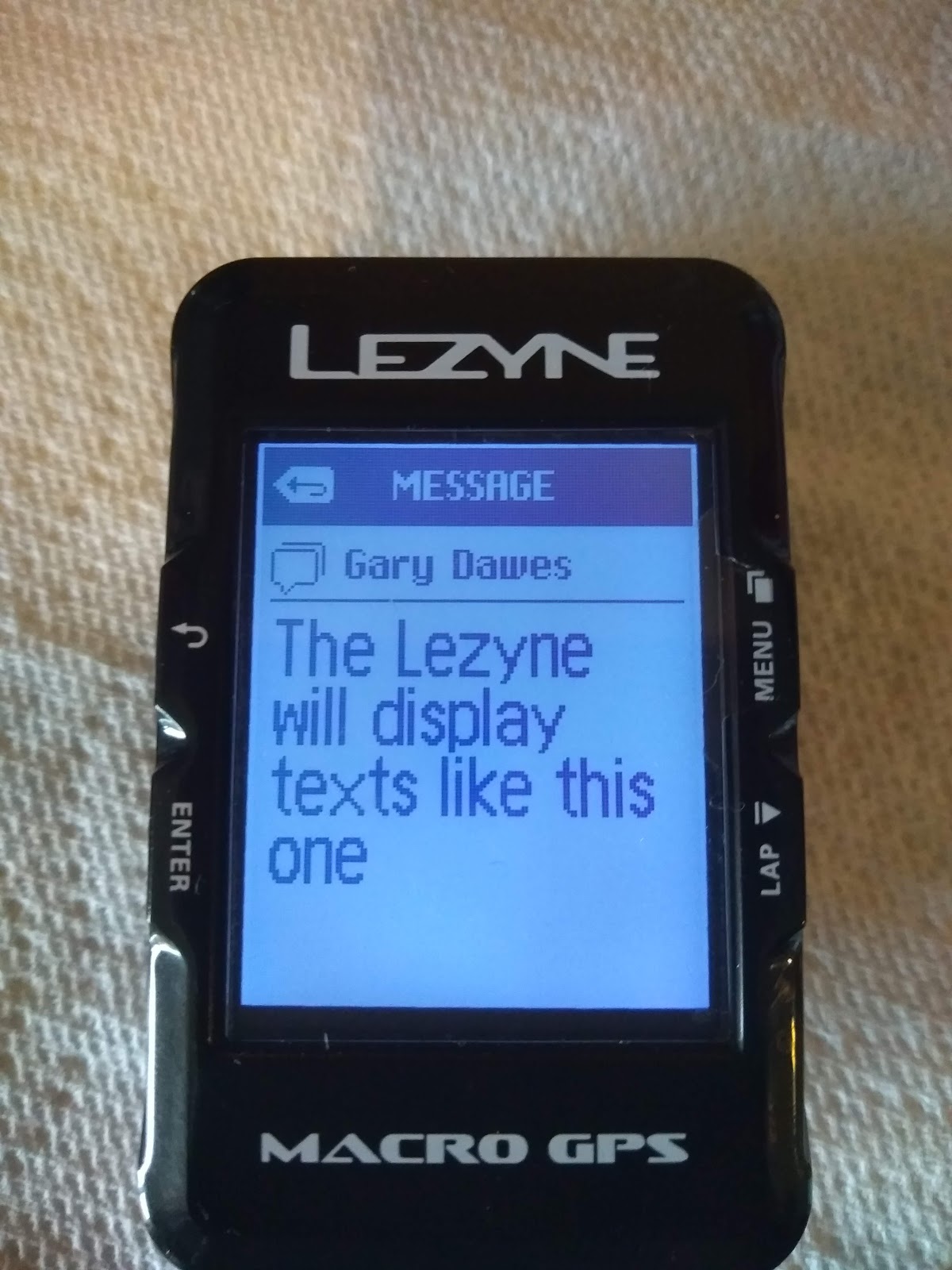
- The Garmin doesn't give me notifications or texts on the device, and the phone is a huge brick when tied to the handlebars. I often get texts on the ride home from work telling me to divert which I don;t see until I get home which kinda defeats the object.
I was tempted by the Garmin 25 which does all I need, but has a silly specific cradle rather than a standard micro-USB lead. The new garmin 130 fits the bill but is north of £150.
Various people have recommended Wahoo Elemnt computers, but again they're north of what I wanted to pay.
The Lezyne GPS devices are keenly priced and do all that I want. There are a few models and Lezyne have a good comparision chart here.
Cos I'm an old bugger now, with dodgy eyesight I quickly ruled out the micro range as too small so it boiled down to a Macro or a Super GPS. The Super adds Glonass (russian GPS), a barometric altimeter, and ANT+ all for an extra £30 or so. It does have Bluetooth so will connect to phones and HRs (I have one so may have a play again). Lezyne do BT speed and cadence sensors too if that floats yer boat.
A bit of shopping and a Macro GPS was soon winging it's way from Germany (ahh, the benefits of being in a single market). With delivery it was still cheaper than buying from UK.
It's about the same size as the old Edge 200, but a bit deeper, and a slightly more functional industrial design. It's not very aero, but then I'm not.
It's a GPS cycle computer so it does all you would expect with no surprises. It records speed, distance, time, elevation. If you have the sensors connected it will show all that info too. It'll upload to Strava cos doesn't everything now?
The startup status screen has GPS signal, and other info like battery life for both Lezyne and phone. It will also pull in similar data from Shimano Di2 and other sensors if you have them
Unlike the garmin which has a set 4 fields with the bottom one rotating, the Lezyne has a max of 5 data pages, each with a selection of layouts offering up to 8 items per page to satisfy the hardcore data geeks. It can auto scroll through the pages.
After only a couple of rides, I'm still playing with all of that, but I've already found I don't like the auto-scroll, and have distilled down to 3 pages

- A page mimicking the Garmin layout (speed, distance, elapsed time, avg speed)
- A second page with additional data (clock, temperature, ascent, and calories burnt)
- A third page with most data on a single page (Elapsed time, speed, distance, avg speed and temp)
The lezyne has some other cool stuff as well such as email and text notifications, and will display when a call comes in. It would be great if the unit could have an option to flash or similar rather than just display, but that's just me
It uses the bluetooth via the phone to auto-upload to Strava if you have the feature enabled as soon as you save the ride. You'll then have to go in to strava and rename the ride and flag as a commute etc if you need to. It will display live strava segments if you're competitive that way (which I am not) and chase KOMs like video game high scores, but you'll need a Strava Premium for that. It doesn't do it for cheapskates on the free plan. All of this also depends on the phone having internet connectivity via wireless or mobile data
There's a companion phone app (Lezyne Ally, and website ). You can create routes in either, or if you have routes in Strava or other platforms you can export as TCX and import in. There is a tease of a menu for direct strava route import but it's still "coming soon". You can then instruct the head unit to follow the route via the app.
Another cool thing the app can do is live navigation. It allows you to select a destination via a search or tapping the screen. It will then route sat nav style on the head unit giving you detailed directions rather than just a breadcrumb like Garmins. I'm not sure what mapping back end they're using but the generated routes do seem to be bike specific so that's good
There is also a live tracking feature, where you specify email contacts and when you start a ride it will automatically squirt off an email with a link for live tracking you when you start a ride. Which is nice
Included in the box is a micro-USB cable. There's also a standard mount for fitting to bars or stem with O rings. Additional bar and forward mounts can be purchased. Sadly the mounting is not compatible with Garmins, which is a shame. A standardised mount across brands would be very useful.
Whilst we're mentioning micro-USB the device's port has a rubber cover, that has a lip on each side to keep it in place, which is a lot better than the edge's press in and hope effort (although that's an old design now). I found it was so snug it was fiddle getting cable to plugin to charge.
As hinted above, Lezyne do seem to be active in adding new software features to the devices and the website and app.
The Macro GPS (and the other Lezyne units) offer a wealth of features that are useful to commuting and transport focused cyclists as well as for the more sport orientated KOM chasers. And for the features they are dirt cheap compared to the competition.